How to set up a shared family calendar everyone actually uses
A shared family calendar sticks when three things are true: family events live in exactly one place, every person has their own color, and the boring recurring stuff is entered once and never again. Miss any of the three and the calendar quietly dies within a month, usually on the phone of the person who set it up.
Here is the setup order that works, whether your household is two adults, a blended family across two homes, or parents plus grandma on school runs.
Set up a shared family calendar
- 1
Pick one home for family events
Choose a single calendar that owns everything family-related. Personal and work calendars can feed into it, but family events get created there and nowhere else.
- 2
Give every person a color
Assign each family member their own color, including kids and pets. The week becomes readable at a glance without opening a single event.
- 3
Enter the recurring backbone once
School pick-ups, clubs, bin day, swimming: set them as recurring events with reminders. This is 80% of the calendar and you only type it once.
- 4
Connect personal calendars
Sync each adult's work or personal calendar in, so clashes show up before they happen. Keep the direction one-way for anything private.
- 5
Review the week together every Sunday
Ten minutes: scan the agenda view, fill gaps, assign owners to anything new. This habit is what keeps the calendar alive past week four.
Why family calendars fail
The usual death spiral: events split across two people's phones, half the entries are on a paper wall calendar, and only one person can see the whole picture. That person becomes the household's human API. Everyone else asks them instead of checking, and after a few weeks even they stop trusting the calendar.
The fix isn't discipline, it's structure. When there is exactly one place a family event can be, checking beats asking, and the calendar starts answering questions instead of creating them.
Color per person beats color per category
Calendar apps love categories: work in blue, health in green, social in yellow. Families don't think in categories, they think in people. The question at breakfast is never "what health events are today", it's "who has what today".
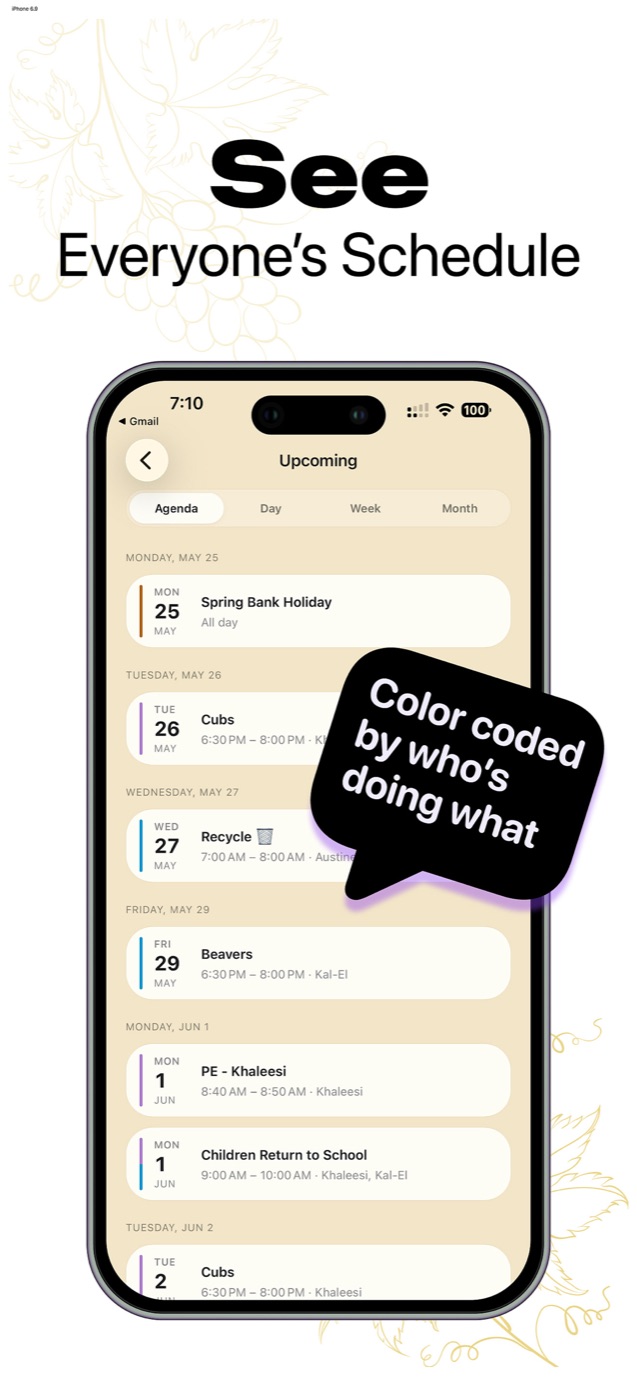
Famora colors every event by its family member, kids and pets included. The agenda view reads like a roll call: Khaleesi's Cubs on Tuesday, Kal-El's Beavers on Friday, recycling on Austine. Nobody has to open events to know whose day is busy.
The recurring backbone
List everything that happens weekly or fortnightly: school runs, clubs, sports, music lessons, bin collection, the cleaner. Enter each once with proper recurrence. Real households need more than "every Monday", which is why Famora supports patterns like every other Tuesday, and lets you cancel one occurrence without deleting the whole series when a club skips a week.
Once the backbone is in, the calendar needs maybe five new entries a week. That is a maintenance level a busy family can actually sustain.
Getting everyone on it, including people without the app
Adults join with an invite code. Kids, grandparents and sitters can be added as profiles without accounts or email addresses, which means their schedules are on the calendar even though they never sign in. Grandma's Wednesday pick-up shows in her color; she just gets told, the old-fashioned way.
For adults who live in Google Calendar, two-way sync means they can keep their habits and still feed the family calendar. Their work meetings stay private; the school play flows both ways.
Common questions
- Which calendar view works best for a family?
- Agenda view for the daily glance, month view for planning ahead. Agenda answers "what's happening and whose is it" in one scroll, which is the question families ask most.
- Should kids be able to see the whole family calendar?
- Older kids with their own devices, yes: it teaches them to check instead of ask. Younger kids don't need access at all, which is exactly why profiles without accounts exist.