How to put kids on the family calendar, no email required
You don't need to invent an email address for a four-year-old to put soccer practice on their schedule. In Famora, kids are profiles, not accounts: a name, a photo and a color that you manage from your own login. The child never signs in, never gets an inbox, and never appears in anyone's user database.
Most family apps get this wrong, and it's the single most common reason a family calendar never gets off the ground.
Why most apps demand an email for every member
Shared-calendar apps are usually built on the same assumption as office software: every participant is a user, and every user authenticates. That model collapses at home. Google requires an account holder to be 13 in most countries. Toddlers can't do email verification, and inventing fake addresses to satisfy a signup form is a chore that stops half of all families at setup.
The household model flips it. One or two adults hold real accounts; everyone else is data those adults manage. Your six-year-old belongs on the calendar for exactly as long as you say so, with nothing to secure, reset or delete later.
Profiles: a color and a schedule, not a login
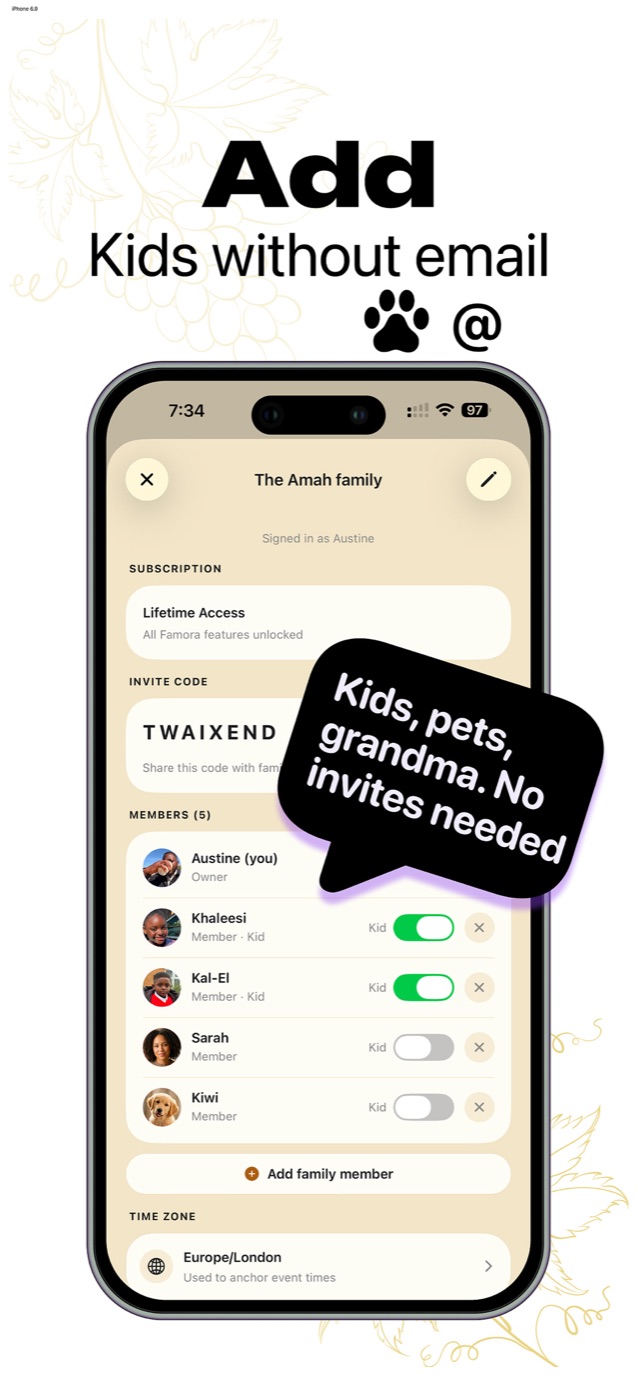
Adding a child in Famora takes about ten seconds: name, optional photo, done. They immediately get their own color and can be assigned to events, chores, meals and shopping items like any adult. Mark them as a Kid and the app treats them accordingly.
The same mechanism covers the dog's vet appointments, grandma's Wednesday pick-up and the sitter's Thursday evening. If someone matters to the household schedule, they belong on the calendar, whether or not they will ever install an app.
What kids can and can't do
A profile can be tagged on anything but can act on nothing. Your child's swimming lesson shows in their color with them as the owner, but only account holders can create, edit or delete. There is no chat to moderate and no notifications going to a child's device, because there is no child's device in the system.
When a teenager is ready for real access, invite them with the household code like any adult. Their history as a profile stays on the calendar.
Common questions
- Is a child profile safer than a child account?
- Yes, structurally. A profile has no credentials to leak, no inbox to phish and no personal login collecting data. The child exists only as entries inside your household, which only invited members can see.
- Can two households share one child's profile?
- Each household manages its own calendar, so in a co-parenting setup each home runs its own copy of the child's schedule. Shared fixtures like school terms can be entered in whichever household organizes them.